An AWS Lambda Event Function runs a handler when it receives an event. You deploy the code and configuration; AWS manages the servers that execute it. The handler is the function Lambda calls with that event.
In part 4 of AWS by Doing, we built the network around an EC2 server and followed an HTTP request through it. We managed the instance, the listening application, and the rules that connected them.
This time, an S3 upload will run a small Node.js handler. We'll make the handler throw after a successful upload, clear the fault, and try a fresh file.
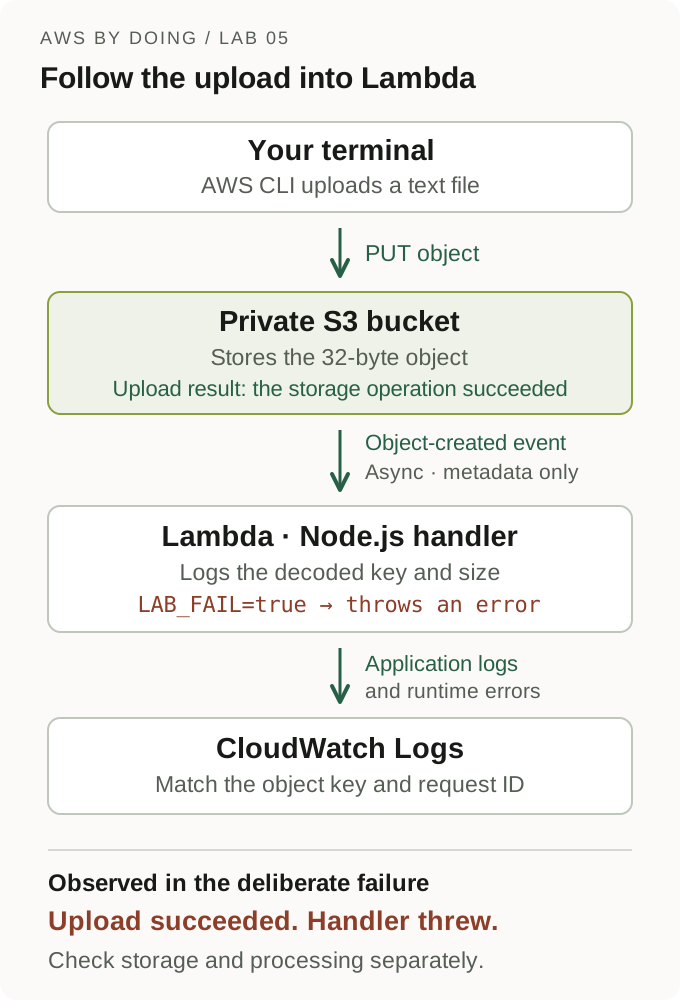
The question to follow is did S3 store the file, and did the handler finish its work? A successful upload can answer the first question while the second operation fails.
This is part 5 of AWS by Doing, using the traditional event-handler model. AWS now calls these Event Functions. The newer HTTP-server model has its own Lambda Web Functions tutorial; we'll compare them after the lab.
We ran this with AWS CLI 2.37.9, local Node.js 24.17.0 and the nodejs24.x Lambda runtime in Ohio, us-east-2, on October 22, 2026. S3 kept the 32-byte file while the handler was failing. Clearing the fault restored processing for a fresh upload.
Quick answer
For this experiment:
- Test a small Node.js handler locally, then deploy it with a dedicated execution role.
- Invoke it directly and connect a private S3 bucket as its trigger.
- Upload a text file and match its key to the handler's log.
- Make the handler throw, then clear the fault and repeat with a fresh file.
- Remove the trigger, function, bucket, role and logs.
We'll compare the upload result with the handler's own success or error at each stage.
What S3 actually sends to Lambda
The notification describes the object: its bucket, encoded key, size and event type. It doesn't contain the file's bytes. S3 invokes Lambda asynchronously, so the uploader doesn't wait for the handler's return value. S3 invocation model
Our handler will log the decoded key and reported byte count. It uses metadata from the event, so it doesn't need to download the file. It also doesn't write objects, which avoids triggering itself with its own output.
Who can invoke the function, and what can it do?
| Permission | Who uses it | What it permits in this lab |
|---|---|---|
| Function resource policy | Amazon S3 | Invoke this function from this bucket and account |
| Execution role | Lambda while running our code | Write to this function's CloudWatch log group |
S3 needs permission to call the function. Once the handler runs, its execution role supplies the AWS permissions for that work. These permissions cover different operations.
Our role only needs logging permissions. A handler that downloads the file would also need s3:GetObject for the relevant object. Resource policies, Execution roles
Before creating resources
You'll need Node.js 24, AWS CLI v2, Python 3, zip and uuidgen, plus an authenticated development account.
Your CLI identity needs permission to create, inspect and delete the dedicated S3 bucket, notification configuration, Lambda function, execution role, inline policy and log group. It also needs iam:PassRole, lambda:InvokeFunction, and permission to configure the function's resource policy and asynchronous invocation settings.
Use only a new disposable bucket. Updating a bucket's notification configuration replaces that configuration; don't substitute an application's existing bucket.
Lambda invocations, S3 storage/requests and CloudWatch Logs can incur charges. Check your billing plan and clean up in the same session. This experiment needs no public bucket, HTTP endpoint, VPC attachment, NAT gateway, provisioned concurrency or scheduled trigger. Lambda pricing
Run the AWS blocks in the same Bash or Zsh terminal. Stop on an unexpected setup error and keep the printed lab directory until cleanup is verified. The failure in step 6 is intentional.
Step 1: Write the handler and try an event locally
Create unique resource names and a clean deployment directory:
set +x
export AWS_PAGER=""
LAB_REGION=us-east-2
LAB_NAME="aws-by-doing-05-$(uuidgen | tr '[:upper:]' '[:lower:]' | cut -c1-12)"
LAB_BUCKET="$LAB_NAME-input"
LAB_ROLE="$LAB_NAME-execution"
LAB_LOG_GROUP="/aws/lambda/$LAB_NAME"
LAB_DIR=$(mktemp -d)
LAB_APP="$LAB_DIR/app"
mkdir "$LAB_APP"

lab_aws() {
  aws --region "$LAB_REGION" --no-cli-pager "$@"
}

printf 'Keep this directory for cleanup: %s\n' "$LAB_DIR"
printf '%s\n' "$LAB_NAME" > "$LAB_DIR/name"
printf '%s\n' "$LAB_BUCKET" > "$LAB_DIR/bucket"
printf '%s\n' "$LAB_ROLE" > "$LAB_DIR/role"
printf '%s\n' "$LAB_REGION" > "$LAB_DIR/region"Save this as index.mjs in the printed directory's app folder:
export async function handler(event, context = {}) {
  const requestId = context.awsRequestId ?? "local";

  if (event?.Service === "Amazon S3" && event.Event === "s3:TestEvent") {
    console.info({ event: "notification_test", requestId });
    return { testEvent: true };
  }

  if (!Array.isArray(event?.Records) || event.Records.length === 0) {
    throw new Error("Expected S3 object-created records");
  }

  const objects = event.Records.map((record) => {
    const object = record?.s3?.object;
    if (
      record?.eventSource !== "aws:s3" ||
      !/^2\.\d+$/.test(record.eventVersion) ||
      typeof record.eventName !== "string" ||
      !record.eventName.startsWith("ObjectCreated:") ||
      typeof object?.key !== "string" || !object.key ||
      !Number.isSafeInteger(object.size) || object.size < 0
    ) {
      throw new Error("Expected S3 object-created records");
    }
    return {
      key: decodeURIComponent(object.key.replace(/\+/g, " ")),
      sizeBytes: object.size,
    };
  });

  if (process.env.LAB_FAIL === "true") {
    console.error({ event: "processing_failed", requestId, keys: objects.map((object) => object.key) });
    throw new Error("Deliberate lab failure");
  }

  for (const object of objects) {
    console.info({ event: "object_created", requestId, ...object });
  }
  return { processed: objects.length };
}The exported name is handler. Lambda's handler setting will be index.handler: the file's base name followed by the exported function name. An .mjs file uses ES modules without needing a package.json. Node.js handler contract
The LAB_FAIL switch lets us introduce one controlled failure later. The logs contain selected metadata, keeping the full event, environment variables and file contents out of the output. Use disposable names here; real object keys can reveal sensitive information.
S3 encodes object keys in the event: a space can arrive as +, and a literal plus sign as %2B. That's why we replace + before calling decodeURIComponent. The s3:TestEvent branch handles S3's differently shaped notification test message. Event structure and encoding
Create a synthetic event. This tests our code; it isn't evidence that S3 delivered a notification:
cat > "$LAB_DIR/event.json" <<'JSON'
{
  "Records": [{
    "eventVersion": "2.1",
    "eventSource": "aws:s3",
    "eventName": "ObjectCreated:Put",
    "s3": {
      "bucket": { "name": "amzn-s3-demo-bucket" },
      "object": { "key": "incoming/synthetic+lambda.txt", "size": 32 }
    }
  }]
}
JSON

node --input-type=module - "$LAB_APP/index.mjs" "$LAB_DIR/event.json" <<'JS'
import fs from "node:fs";
import { pathToFileURL } from "node:url";
const { handler } = await import(pathToFileURL(process.argv[2]).href);
const event = JSON.parse(fs.readFileSync(process.argv[3], "utf8"));
console.log(await handler(event, { awsRequestId: "local-test" }));
JSExpect a log entry with key: incoming/synthetic lambda.txt, sizeBytes: 32, and a return value of processed: 1. That size comes from our test payload. This invocation doesn't contact S3; a different key will identify the real upload later.
The local tests also covered key decoding, multiple records, newer minor event versions, the S3 test-message format, invalid input, and failure followed by recovery.
Step 2: Create the bucket, log group and execution role
We'll create the log group first, then give the role permission to create streams and write logs inside it. The group keeps logs for one day, and we'll delete it during cleanup.
LAB_ACCOUNT=$(lab_aws sts get-caller-identity --query Account --output text)

lab_aws s3api create-bucket --bucket "$LAB_BUCKET" \
  --create-bucket-configuration "LocationConstraint=$LAB_REGION"
lab_aws s3api put-public-access-block --bucket "$LAB_BUCKET" \
  --public-access-block-configuration \
    BlockPublicAcls=true,IgnorePublicAcls=true,BlockPublicPolicy=true,RestrictPublicBuckets=true
lab_aws s3api put-bucket-encryption --bucket "$LAB_BUCKET" \
  --server-side-encryption-configuration \
    '{"Rules":[{"ApplyServerSideEncryptionByDefault":{"SSEAlgorithm":"AES256"}}]}'

lab_aws logs create-log-group --log-group-name "$LAB_LOG_GROUP"
lab_aws logs put-retention-policy --log-group-name "$LAB_LOG_GROUP" \
  --retention-in-days 1

python3 - "$LAB_DIR" "$LAB_REGION" "$LAB_ACCOUNT" "$LAB_LOG_GROUP" <<'PY'
import json
import sys
from pathlib import Path

directory, region, account, group = sys.argv[1:]
directory = Path(directory)
trust = {
    "Version": "2012-10-17",
    "Statement": [{
        "Effect": "Allow",
        "Principal": {"Service": "lambda.amazonaws.com"},
        "Action": "sts:AssumeRole"
    }]
}
logs = {
    "Version": "2012-10-17",
    "Statement": [{
        "Effect": "Allow",
        "Action": ["logs:CreateLogStream", "logs:PutLogEvents"],
        "Resource": f"arn:aws:logs:{region}:{account}:log-group:{group}:*"
    }]
}
(directory / "trust.json").write_text(json.dumps(trust))
(directory / "logs-policy.json").write_text(json.dumps(logs))
PY

LAB_ROLE_ARN=$(lab_aws iam create-role --role-name "$LAB_ROLE" \
  --assume-role-policy-document "file://$LAB_DIR/trust.json" \
  --query Role.Arn --output text)
printf '%s\n' "$LAB_ROLE_ARN" > "$LAB_DIR/role-arn"
lab_aws iam put-role-policy --role-name "$LAB_ROLE" \
--policy-name LabLogs --policy-document "file://$LAB_DIR/logs-policy.json"The generated policy and ARN contain your account identifier. Keep them local and redact identifiers before sharing output. Shell tracing and AWS debug logging should stay disabled.
Step 3: Deploy and inspect the function response
Package only index.mjs, at the ZIP's root:
(cd "$LAB_APP" && zip -q "$LAB_DIR/function.zip" index.mjs)

lab_aws lambda create-function --function-name "$LAB_NAME" \
  --runtime nodejs24.x --handler index.handler \
  --role "$LAB_ROLE_ARN" --architectures arm64 \
  --memory-size 128 --timeout 5 \
  --environment '{"Variables":{"LAB_FAIL":"false"}}' \
  --logging-config "LogGroup=$LAB_LOG_GROUP,LogFormat=JSON,ApplicationLogLevel=INFO,SystemLogLevel=INFO" \
  --zip-file "fileb://$LAB_DIR/function.zip" > "$LAB_DIR/function.json"

lab_aws lambda wait function-active-v2 --function-name "$LAB_NAME"
LAB_FUNCTION_ARN=$(lab_aws lambda get-function-configuration \
  --function-name "$LAB_NAME" --query FunctionArn --output text)

lab_aws lambda put-function-event-invoke-config --function-name "$LAB_NAME" \
  --maximum-retry-attempts 0 --maximum-event-age-in-seconds 60 \
  > "$LAB_DIR/async-config.json"

lab_aws lambda invoke --function-name "$LAB_NAME" \
  --invocation-type RequestResponse --cli-binary-format raw-in-base64-out \
  --payload "file://$LAB_DIR/event.json" "$LAB_DIR/direct-response.json" \
  > "$LAB_DIR/direct-invoke.json"

cat "$LAB_DIR/direct-invoke.json"
cat "$LAB_DIR/direct-response.json"A new IAM role can take time to become assumable. If creation fails for role propagation, inspect the role, allow time, and check whether the named function exists before retrying. Don't create replacement roles or duplicate functions to work around it.
Our synchronous invocation returned the following CLI metadata:
{"StatusCode":200,"ExecutedVersion":"$LATEST"}There was no FunctionError. The separate function response file contained:
{"processed":1}CloudWatch recorded object_created for incoming/synthetic lambda.txt, with sizeBytes: 32. Our handler processed the sample payload. The real bucket trigger comes next.
$LATEST is the function's unpublished version. The later environment updates change its configuration; this lab doesn't publish numbered versions or use aliases.
Check both files. An invocation can return StatusCode: 200 while the handler throws, with FunctionError identifying the failure and the payload describing it. We'll see that in step 6. Invoke response semantics
We set asynchronous function-error retries to zero and maximum event age to 60 seconds for this disposable experiment. This affects asynchronous processing, not our synchronous probe. It doesn't guarantee exactly one delivery or disable all throttling/system-error retries. Asynchronous invocation settings
Step 4: Connect this bucket to this function
Grant S3 permission before configuring its notification destination:
lab_aws lambda add-permission --function-name "$LAB_NAME" \
  --statement-id AllowS3Lab --action lambda:InvokeFunction \
  --principal s3.amazonaws.com --source-arn "arn:aws:s3:::$LAB_BUCKET" \
  --source-account "$LAB_ACCOUNT" > "$LAB_DIR/invoke-permission.json"

python3 - "$LAB_DIR" "$LAB_FUNCTION_ARN" <<'PY'
import json
import sys
from pathlib import Path

configuration = {"LambdaFunctionConfigurations": [{
    "Id": "incoming-text",
    "LambdaFunctionArn": sys.argv[2],
    "Events": ["s3:ObjectCreated:*"],
    "Filter": {"Key": {"FilterRules": [
        {"Name": "prefix", "Value": "incoming/"},
        {"Name": "suffix", "Value": ".txt"}
    ]}}
}]}
(Path(sys.argv[1]) / "notification.json").write_text(json.dumps(configuration))
PY

lab_aws s3api put-bucket-notification-configuration --bucket "$LAB_BUCKET" \
  --notification-configuration "file://$LAB_DIR/notification.json"
lab_aws s3api get-bucket-notification-configuration --bucket "$LAB_BUCKET" \
> "$LAB_DIR/notification-installed.json"The bucket and function must be in the same region. Check that the installed configuration targets this function and filters for incoming/ and .txt. Our readback used Prefix and Suffix as the filter names, with the requested values. Only use this replacement operation on the new lab bucket. Notification configuration and destination validation
If notification_test appears during setup, treat it as the test message. The real-upload check needs the object's key.
Step 5: Upload a file and follow its event
printf 'Hello from AWS by Doing, lab 5.\n' > "$LAB_DIR/input.txt"
wc -c < "$LAB_DIR/input.txt"

lab_aws s3api put-object --bucket "$LAB_BUCKET" \
  --key 'incoming/hello lambda.txt' --body "$LAB_DIR/input.txt" \
  --content-type text/plain > "$LAB_DIR/upload-baseline.json"

lab_aws logs tail "$LAB_LOG_GROUP" --since 10m --format shortThe file is 32 bytes, including its newline. Our upload succeeded, and a separate head-object check reported ContentLength: 32 with AES256 encryption. At 08:02:03 PDT, CloudWatch recorded these selected message fields, with the invocation ID omitted:
{"event":"object_created","key":"incoming/hello lambda.txt","sizeBytes":32}Lambda's JSON logs include an invocation request ID. We used it to match this entry to its completion report. Check the object key too: the earlier synthetic invocation also produced a success log. Node.js structured logs
Delivery and log visibility are asynchronous. Query again if needed, and wait for this baseline before changing the function configuration. If it doesn't appear, inspect the notification, resource policy, execution role and function logs before uploading more objects.
With the direct invocation, we could inspect processed: 1 in the response file. With the S3 trigger, the uploader receives the storage operation's result. The handler finishes separately, so its result needs its own check.
Step 6: Keep the upload working while the handler fails
Enable the fault on this disposable function and wait for its configuration update:
lab_aws lambda update-function-configuration --function-name "$LAB_NAME" \
  --environment '{"Variables":{"LAB_FAIL":"true"}}' > "$LAB_DIR/failing-config.json"
lab_aws lambda wait function-updated-v2 --function-name "$LAB_NAME"

lab_aws lambda invoke --function-name "$LAB_NAME" \
  --invocation-type RequestResponse --cli-binary-format raw-in-base64-out \
  --payload "file://$LAB_DIR/event.json" "$LAB_DIR/error-response.json" \
  > "$LAB_DIR/error-invoke.json"
cat "$LAB_DIR/error-invoke.json"
cat "$LAB_DIR/error-response.json"

lab_aws s3api put-object --bucket "$LAB_BUCKET" \
  --key 'incoming/failing lambda.txt' --body "$LAB_DIR/input.txt" \
  --content-type text/plain > "$LAB_DIR/upload-failing.json"
lab_aws logs tail "$LAB_LOG_GROUP" --since 10m --format shortThe direct invocation returned:
{"StatusCode":200,"FunctionError":"Unhandled","ExecutedVersion":"$LATEST"}The error response's relevant fields were:
{"errorType":"Error","errorMessage":"Deliberate lab failure"}The real S3 upload also completed successfully. At 08:02:30 PDT, its handler logged these selected fields:
{"event":"processing_failed","keys":["incoming/failing lambda.txt"]}The runtime error for that same invocation ID contained errorType: Error and errorMessage: Deliberate lab failure. The direct probe used the synthetic key, so we could distinguish its failure from the real upload's failure.
Check the object if you need to separate storage from processing:
lab_aws s3api head-object --bucket "$LAB_BUCKET" \
--key 'incoming/failing lambda.txt' --query ContentLength --output textThe check returned 32. S3 kept the object despite the handler error.
Wait for the failing object's log before clearing the fault. Otherwise, a delayed event might first execute after the configuration changes and fail to demonstrate the intended comparison.
We explicitly disabled additional function-error retries for this lab. By default, asynchronous handler errors receive two additional attempts. Throttling and system errors follow different retry behavior; even a successful handler can receive a duplicate event. Discarded events aren't retained here because this disposable setup has no failure destination or dead-letter queue. Error handling and retries
Step 7: Clear the fault and verify a fresh upload
lab_aws lambda update-function-configuration --function-name "$LAB_NAME" \
  --environment '{"Variables":{"LAB_FAIL":"false"}}' > "$LAB_DIR/recovered-config.json"
lab_aws lambda wait function-updated-v2 --function-name "$LAB_NAME"

lab_aws s3api put-object --bucket "$LAB_BUCKET" \
  --key 'incoming/recovered lambda.txt' --body "$LAB_DIR/input.txt" \
  --content-type text/plain > "$LAB_DIR/upload-recovered.json"
lab_aws logs tail "$LAB_LOG_GROUP" --since 10m --format shortThe fresh upload succeeded. At 08:02:50 PDT, its selected application-message fields were:
{"event":"object_created","key":"incoming/recovered lambda.txt","sizeBytes":32}Its stored size was also 32 bytes, and the matching invocation completed. The fresh object was processed successfully. That doesn't tell us whether the earlier failed event was replayed or recovered.
What we observed
These are the results from our October 22, 2026 run. Times use America/Los_Angeles (PDT): application log timestamps for the invocations, and the final absence checks for cleanup.
| PDT time | Check | Observed result |
|---|---|---|
| 08:01:49 | Direct synthetic event | API status 200, no FunctionError, exact {"processed":1} body |
| 08:02:03 | Real baseline upload | Upload succeeded; stored size 32; object_created for incoming/hello lambda.txt |
| 08:02:21 | Direct invocation while failing | API status 200 plus FunctionError: Unhandled; Deliberate lab failure error payload |
| 08:02:30 | Real upload while failing | Upload succeeded; stored size 32; matching processing_failed and runtime error |
| 08:02:50 | Fresh upload after clearing the fault | Stored size 32; object_created for incoming/recovered lambda.txt |
| 08:03:25 | Cleanup complete | Trigger removed; function, async configuration, invoke policy, bucket, role and log group absent |
Our saved CloudWatch query contained 20 events, including five application messages and five completion reports. Each application message matched a report by invocation ID. Both failure messages also matched runtime error records.
All five completion reports contained status: success, including the handler failures. We identified those failures through the direct invocation's FunctionError and the runtime error records for the same invocation IDs. In this run, the completion report's status alone wasn't enough.
We didn't measure the bill, throughput or cold-start distributions. These uploads also don't prove exactly-once delivery.
Retries make idempotency part of the design
S3 notifications can be duplicated and can arrive out of order. Our example only logs metadata, so processing a duplicate produces another log entry. A handler that sends an email, charges a payment or updates a record needs a deliberate way to prevent repeated side effects.
Use a stable identifier for the work and store its completion durably. Choose that identifier from the event or business operation; use Lambda's request ID to correlate the logs. S3 ordering and duplicate events
Our sample stops at logging metadata. A durable record of completed work would be another part of the application.
What you still manage
Lambda manages the execution environments that run the handler. It can reuse an environment, so don't assume each event gets a fresh process. Local files aren't durable application storage. Execution environment lifecycle
You still own the handler, runtime choice, dependency updates, input validation, permissions, memory and timeout settings, retries and duplicate handling. You also need a way to check that the work finished.
Where Lambda Web Functions fit
This lab exports a handler that receives an event. An S3 notification is its input; there's no listening HTTP server in our code.
A Lambda Web Function uses a different contract: your Node.js application starts an HTTP server, and a managed HTTPS endpoint forwards requests to it. I covered deployment, a startup failure, logs and recovery in AWS Lambda Web Functions Tutorial: Deploy a Node.js API.
This upload-triggered task fits an Event Function. For a conventional Node.js HTTP API, the Web Functions walkthrough follows the familiar server model. Keep their invocation behavior separate; the event retry settings in this lab don't apply to HTTP requests in that tutorial.
Clean up the trigger and supporting resources
First inspect the recorded names and confirm that every resource belongs to this run:
lab_aws lambda get-function-configuration --function-name "$LAB_NAME" \
  --query '{Name:FunctionName,State:State,Role:Role}' --output json
lab_aws s3api get-bucket-notification-configuration --bucket "$LAB_BUCKET"After the recorded invocations have finished, disable future bucket notifications before deleting the function:
lab_aws s3api put-bucket-notification-configuration --bucket "$LAB_BUCKET" \
  --notification-configuration '{}'
lab_aws s3api get-bucket-notification-configuration --bucket "$LAB_BUCKET"

lab_aws lambda delete-function-event-invoke-config --function-name "$LAB_NAME"
lab_aws lambda remove-permission --function-name "$LAB_NAME" --statement-id AllowS3Lab
lab_aws lambda delete-function --function-name "$LAB_NAME"
lab_aws lambda get-function-configuration --function-name "$LAB_NAME"
lab_aws lambda get-function-event-invoke-config --function-name "$LAB_NAME"
lab_aws lambda get-policy --function-name "$LAB_NAME"Expect an empty bucket notification configuration, then ResourceNotFoundException for the function, asynchronous configuration and invocation policy. We explicitly remove the asynchronous settings and S3 invoke permission before deleting the function. Removing the trigger doesn't cancel events already accepted into the asynchronous queue. Don't keep uploading while cleaning up. Deleting asynchronous settings, Removing invocation permission
This bucket was created without versioning or Object Lock. Delete the three known input keys, then the bucket and the other dedicated resources:
lab_aws s3api delete-object --bucket "$LAB_BUCKET" --key 'incoming/hello lambda.txt'
lab_aws s3api delete-object --bucket "$LAB_BUCKET" --key 'incoming/failing lambda.txt'
lab_aws s3api delete-object --bucket "$LAB_BUCKET" --key 'incoming/recovered lambda.txt'
lab_aws s3api delete-bucket --bucket "$LAB_BUCKET"

lab_aws iam delete-role-policy --role-name "$LAB_ROLE" --policy-name LabLogs
lab_aws iam delete-role --role-name "$LAB_ROLE"
lab_aws logs delete-log-group --log-group-name "$LAB_LOG_GROUP"

lab_aws s3api head-bucket --bucket "$LAB_BUCKET"
lab_aws iam get-role --role-name "$LAB_ROLE"
lab_aws logs describe-log-groups --log-group-name-prefix "$LAB_LOG_GROUP" \
--query 'logGroups[].logGroupName' --output jsonExpect a bucket 404, NoSuchEntity for the role, and absence of the exact lab log group. Permission and connection failures don't establish deletion. If the bucket isn't empty, inspect it for additional objects rather than deleting an unidentified bucket's contents. A versioned bucket needs version-aware cleanup; don't substitute an older series bucket.
Our cleanup checks finished at 08:03:25 PDT on October 22. The notification configuration was empty; the function, asynchronous configuration and invoke policy returned ResourceNotFoundException; the bucket returned 404; the role returned NoSuchEntity; and the exact log group was absent. The three input keys were deleted before the bucket. No resource created by this run remains active.
If you stop partway through setup, clean up only the dedicated resources that were actually created. Keep the local files until the absence checks are complete.
Follow the work after the upload
“The upload worked” answers a storage question. To check processing, follow that object's key into Lambda's logs and inspect the handler's result.
On your next upload-triggered task, check the stored object, the matching invocation logs and the failure-handling configuration. Decide how you'll record completion before relying on retries.
Related posts
- Understanding Amazon S3 by Uploading One File — the storage and access behavior behind our input bucket.
- Understanding AWS IAM: Upload Allowed, Download Denied — why each operation needs its own permissions.
- AWS VPC: Follow a Request Into Your EC2 Server — the server and network controls from the previous lab.
- AWS Lambda Web Functions Tutorial: Deploy a Node.js API — the separate HTTP-server tutorial.