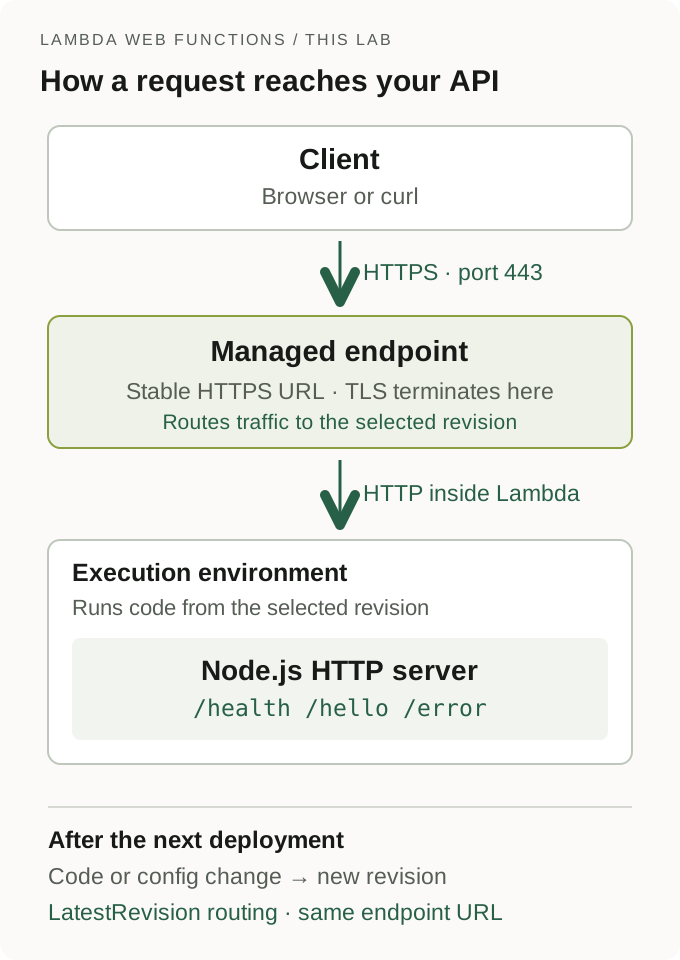
AWS Lambda Web Functions run a normal HTTP server on Lambda. Your Node.js application listens on an address supplied by AWS, and a managed HTTPS endpoint forwards requests to it. You deploy the application; AWS manages its execution environments and scaling. Web Functions overview
AWS announced the feature on October 12, 2026. It also introduced the name Event Functions for the existing event-handler model. That rename doesn't require changes to existing functions. Launch announcement
If you've built a Node.js API, the new programming model should look familiar: create a server, register routes, and start listening. There's no event-to-HTTP adapter in this example.
We'll build a small API, test it locally, deploy it, and inspect what happens when application code fails. Then we'll deploy an entry file that throws during startup and recover with a corrected revision.
A successful deployment still leaves one question: does the application answer a request? We'll check the status, response body and logs to find out.
We ran the lab on October 20, 2026, with AWS CLI 2.37.9, local Node.js 24.17.0 and the nodejs24.x Web Function runtime in Ohio. The startup-failure revision showed Active, but its request returned HTTP 502. Restoring the entry file brought back HTTP 200 at the same endpoint URL.
Quick answer
To deploy a Node.js API with Lambda Web Functions:
- Use a supported AWS CLI v2 release with
aws lambda-webcommands. - Start an HTTP server using
AWS_LAMBDA_HTTP_ENDPOINTfor its listen address. - Put
index.jsat the root of the application directory and deploy it usingaws lambda-web deploy. - Wait for the revision and endpoint, then test the actual HTTPS response.
- Inspect application and platform logs when a request fails.
- Delete the Web Function and its supporting storage, role and logs after the lab.
We'll use Node.js 24 and one HomeRegion endpoint in Ohio (us-east-2). You won't need an EC2 instance or a VPC setup for this lab.
Web Functions, Event Functions and Function URLs
These names describe different pieces of Lambda:
| Option | What your application receives | What you write |
|---|---|---|
| Web Function | HTTP requests forwarded to a listening server | A Node.js HTTP server |
| Event Function | An event passed to a handler | A handler that processes the event and returns a result |
| Function URL | An HTTPS entry point for an Event Function | The Event Function's handler, using its HTTP event/response format |
A Function URL maps an HTTP request into an event for the handler, then maps its return value back into an HTTP response. A Web Function forwards the request to your listening server. The Function URL invocation documentation describes the event and response format.
Web Functions currently support the nodejs24.x runtime. Express, Fastify and other frameworks that start a Node.js HTTP server can use this model. We'll use Node's built-in http module so there are no application packages to install. Supported runtime and frameworks
What we're building
Our API has three GET routes:
| Route | Behavior |
|---|---|
/health | Returns a status and application version |
/hello?name=Ravi | Returns a JSON greeting |
/error | Raises a deliberate error that our application converts into HTTP 500 |
Unknown routes return 404. Unsupported methods return 405. The version field lets us check whether a later deployment is serving the new configuration.
A Web Function contains revisions and endpoints. Each revision is an immutable snapshot of code and configuration. An endpoint has an HTTPS address and routes traffic to a revision. We'll use LatestRevision mode, which moves this lab endpoint to a new revision after it becomes active. Resource model
Before creating resources
You'll need Node.js 24, AWS CLI v2, Python 3, curl, uuidgen, and an authenticated development account. Check CLI support:
aws --version
aws lambda-web help
node --versionThe caller needs permission to manage Web Functions, pass the dedicated execution role with iam:PassRole, manage this lab's IAM role and inline policy, create and configure its deployment bucket, upload and read code versions, inspect logs, and remove those resources. The execution role needs CloudWatch Logs permissions. These are different identities: your caller deploys the app; Lambda assumes the execution role while running it.
At launch, AWS listed availability in Northern Virginia, Ohio, Oregon, Tokyo and Ireland. We'll stay in Ohio and use one HomeRegion endpoint. Check the launch and current regional availability before choosing another region.
Requests, CPU, memory, data transfer, deployment storage and logs can incur charges. Check your account's billing plan and read the cleanup section before deploying. This lab's endpoint is publicly reachable and serves only disposable demonstration data. ApplicationManaged authentication means the application owns authentication; our example doesn't implement it. Endpoint access control
Run the setup and AWS commands in the same Bash or Zsh terminal. Keep the local server in a separate terminal. Stop on an unexpected setup error, and retain the lab directory and names until cleanup is verified.
Step 1: Build a small Node.js API
Create a unique run name and a local directory:
set +x
export AWS_PAGER=""
LAB_REGION=us-east-2
LAB_NAME="lambda-web-api-$(uuidgen | tr '[:upper:]' '[:lower:]' | cut -c1-12)"
LAB_DIR=$(mktemp -d)
LAB_APP="$LAB_DIR/app"
LAB_BUCKET="$LAB_NAME-code"
LAB_ROLE="$LAB_NAME-execution"
mkdir "$LAB_APP"

lab_aws() {
  aws --region "$LAB_REGION" --no-cli-pager "$@"
}

printf 'Keep this directory for cleanup: %s\n' "$LAB_DIR"
printf '%s\n' "$LAB_REGION" > "$LAB_DIR/region"
printf '%s\n' "$LAB_NAME" > "$LAB_DIR/name"
printf '%s\n' "$LAB_BUCKET" > "$LAB_DIR/bucket"
printf '%s\n' "$LAB_ROLE" > "$LAB_DIR/role"

cat > "$LAB_APP/package.json" <<'JSON'
{
  "name": "lambda-web-api-lab",
  "private": true,
  "type": "module",
  "scripts": { "start": "node index.js" },
  "engines": { "node": ">=24" }
}
JSONSave the following as api.js inside the printed lab directory's app folder:
import { createServer } from "node:http";

export function createApiServer({ version = "v1", log = console.log } = {}) {
  return createServer((request, response) => {
    const requestId = request.headers["lambda-web-request-id"] ?? null;
    const send = (status, body) => {
      response.writeHead(status, {
        "Content-Type": "application/json; charset=utf-8",
        "Cache-Control": "no-store",
      });
      response.end(JSON.stringify(body) + "\n");
      log({ event: "response", requestId, status, version });
    };

    try {
      const url = new URL(request.url, "http://localhost");
      if (request.method !== "GET") {
        response.setHeader("Allow", "GET");
        return send(405, { error: "Method not allowed" });
      }
      if (url.pathname === "/health") {
        return send(200, { status: "ok", version });
      }
      if (url.pathname === "/hello") {
        const name = (url.searchParams.get("name") ?? "reader").trim();
        if (!name || name.length > 80) {
          return send(400, { error: "Use a name between 1 and 80 characters" });
        }
        return send(200, { message: `Hello, ${name}!`, version });
      }
      if (url.pathname === "/error") {
        throw new Error("Deliberate lab error");
      }
      return send(404, { error: "Not found" });
    } catch (error) {
      log({ event: "request_failed", requestId, error: error.message });
      return send(500, { error: "Internal server error" });
    }
  });
}The catch block returns a small error response and keeps the stack trace out of the response body. The logs contain status, version and a correlation ID. We don't print environment variables, authorization headers or full request payloads. Remove the deliberate /error route from a real API.
Now create index.js beside api.js:
import { createApiServer } from "./api.js";

const [host, port] = (
  process.env.AWS_LAMBDA_HTTP_ENDPOINT ?? "127.0.0.1:8080"
).split(":");

const server = createApiServer({
  version: process.env.APP_VERSION ?? "v1",
  log: (entry) => console.info(entry),
});

server.listen(Number(port), host, () => {
  console.info({ event: "listening", host, port: Number(port) });
});The listen address is the important integration point. Locally, our fallback is 127.0.0.1:8080. In Lambda, AWS_LAMBDA_HTTP_ENDPOINT supplies the host and port. Hardcoding the local address for the deployed server would prevent requests from reaching it. AWS terminates TLS at the HTTPS endpoint and forwards plain HTTP to this internal server.
Step 2: Test the API locally
In a second terminal, change into the app directory you created and run:
node index.jsBack in the setup terminal:
curl --noproxy '*' -sS -i http://127.0.0.1:8080/health
curl --noproxy '*' -sS -i 'http://127.0.0.1:8080/hello?name=Ravi'
curl --noproxy '*' -sS -i http://127.0.0.1:8080/missing
curl --noproxy '*' -sS -i http://127.0.0.1:8080/error
curl --noproxy '*' -sS -i http://127.0.0.1:8080/healthCheck for 200, 200, 404, 500 and 200, respectively. The final health check matters: it verifies the application still serves requests after the handled exception. The greeting body is:
{"message":"Hello, Ravi!","version":"v1"}We're checking an HTTP API, so inspect its status and body. A successful curl transfer alone doesn't establish a successful application response.
Our local regression check also verified the name-length validation, unsupported-method response and successful health check after the handled exception.
Stop the local server with Ctrl+C when you've finished. If port 8080 is occupied, choose a different local address with AWS_LAMBDA_HTTP_ENDPOINT=127.0.0.1:8081 node index.js and update your local curl URLs.
Step 3: Give this deployment its own storage and role
The deploy helper can create defaults, including a deployment bucket shared by other Web Functions in the same account and region. We'll supply a dedicated bucket and role so the lab's ownership and cleanup are explicit.
LAB_ACCOUNT=$(lab_aws sts get-caller-identity --query Account --output text)

lab_aws s3api create-bucket --bucket "$LAB_BUCKET" \
  --create-bucket-configuration "LocationConstraint=$LAB_REGION"
lab_aws s3api put-public-access-block --bucket "$LAB_BUCKET" \
  --public-access-block-configuration \
    BlockPublicAcls=true,IgnorePublicAcls=true,BlockPublicPolicy=true,RestrictPublicBuckets=true
lab_aws s3api put-bucket-versioning --bucket "$LAB_BUCKET" \
  --versioning-configuration Status=Enabled
lab_aws s3api put-bucket-encryption --bucket "$LAB_BUCKET" \
  --server-side-encryption-configuration \
    '{"Rules":[{"ApplyServerSideEncryptionByDefault":{"SSEAlgorithm":"AES256"}}]}'

python3 - "$LAB_DIR" "$LAB_REGION" "$LAB_ACCOUNT" "$LAB_NAME" "$LAB_BUCKET" <<'PY'
import json
import sys
from pathlib import Path

directory, region, account, name, bucket = sys.argv[1:]
directory = Path(directory)
policies = {
    "bucket-policy.json": {
        "Version": "2012-10-17",
        "Statement": [{
            "Effect": "Allow",
            "Principal": {"Service": "lambda.amazonaws.com"},
            "Action": ["s3:GetObject", "s3:GetObjectVersion"],
            "Resource": f"arn:aws:s3:::{bucket}/lambda-web/{name}/*",
            "Condition": {"ArnLike": {
                "aws:SourceArn": f"arn:aws:lambda:{region}:{account}:web-function/{name}/revision/*"
            }}
        }]
    },
    "trust.json": {
        "Version": "2012-10-17",
        "Statement": [{
            "Effect": "Allow",
            "Principal": {"Service": "lambda.amazonaws.com"},
            "Action": "sts:AssumeRole"
        }]
    },
    "logs-policy.json": {
        "Version": "2012-10-17",
        "Statement": [{
            "Effect": "Allow",
            "Action": ["logs:CreateLogGroup", "logs:CreateLogStream", "logs:PutLogEvents"],
            "Resource": f"arn:aws:logs:{region}:{account}:log-group:/aws/lambda/web/{name}*"
        }]
    }
}
for filename, policy in policies.items():
    (directory / filename).write_text(json.dumps(policy, indent=2))
PY

lab_aws s3api put-bucket-policy --bucket "$LAB_BUCKET" \
  --policy "file://$LAB_DIR/bucket-policy.json"
LAB_ROLE_ARN=$(lab_aws iam create-role --role-name "$LAB_ROLE" \
  --assume-role-policy-document "file://$LAB_DIR/trust.json" \
  --query Role.Arn --output text)
printf '%s\n' "$LAB_ROLE_ARN" > "$LAB_DIR/role-arn"
lab_aws iam put-role-policy --role-name "$LAB_ROLE" \
--policy-name LabLogs --policy-document "file://$LAB_DIR/logs-policy.json"The bucket stays private. Its policy gives the Lambda service permission to read only this function's code prefix, with a source condition for its revisions. The execution role's policy grants logging for this uniquely named function. Neither policy gives the application general access to S3.
Versioning is required: Lambda pins each revision to a specific code-object version. Retain those versions while their revisions are in use. Deleting an active revision's code version can make that revision fail. Deployment bucket requirements and object lifecycle
The generated files and role ARN contain account identifiers. Keep them local and redact identifiers before sharing command output. Keep shell tracing and AWS debug logging disabled.
Step 4: Deploy the Node.js API
lab_aws lambda-web deploy \
  --name "$LAB_NAME" --code "$LAB_APP" --create \
  --bucket-name "$LAB_BUCKET" --execution-role-arn "$LAB_ROLE_ARN" \
  --runtime nodejs24.x --env APP_VERSION=v1 \
  --endpoint-name lab --endpoint-type HomeRegion \
  --auth-type ApplicationManaged --auto-deployment-mode LatestRevision \
  --timeout-seconds 10 --max-concurrency-per-environment 2 \
  --max-environments 2 --rate-limit 100 \
  --application-log-level INFO --system-log-level INFO \
  --revision-description baseline

lab_aws lambda-web get-web-function-endpoint \
  --function-name "$LAB_NAME" --endpoint-name lab \
  --output json > "$LAB_DIR/endpoint.json"

LAB_URL=$(python3 - "$LAB_DIR/endpoint.json" <<'PY'
import json
import sys
from pathlib import Path

endpoint = json.loads(Path(sys.argv[1]).read_text())
assert endpoint["state"] == "Active", "Endpoint is not active"
print("https://" + endpoint["domainName"])
PY
)
printf '%s\n' "$LAB_URL" > "$LAB_DIR/endpoint-url"The command uploads the package, creates a revision, creates the lab endpoint and waits for activation. --create confirms creation without an interactive prompt. A fresh IAM role can take time to become assumable; for a role-propagation error, inspect the role and retry the same named deployment after a short wait. Don't create more roles or functions to bypass it.
The endpoint permits unsigned requests because we chose ApplicationManaged. To restrict invocation to authorized AWS identities, choose IamAuth; callers need signed requests and invoke permission. A resource policy doesn't restrict invocation on an ApplicationManaged endpoint.
These settings limit the lab's traffic and scaling. Two is the minimum supported value for maxEnvironments; it caps environments without reserving two running environments. We set rateLimit to 100 requests per second, the lowest supported nonzero setting. These controls aren't a spending cap, and Lambda documents temporary environment-cap overshoot during some operations. Scaling controls
Step 5: Test the HTTPS endpoint
Repeat our local checks against AWS:
curl --noproxy '*' -sS -i "$LAB_URL/health"
curl --noproxy '*' -sS -i "$LAB_URL/hello?name=Ravi"
curl --noproxy '*' -sS -i "$LAB_URL/missing"
curl --noproxy '*' -sS -i "$LAB_URL/error"
curl --noproxy '*' -sS -i "$LAB_URL/health"The deliberate /error response comes from our application: our request handler catches the exception and returns JSON with HTTP 500. Keep the response headers too. A lambda-web-error-type header can help identify a failure in the platform's request path, such as the initialization failure we'll test next.
Our deployed requests returned 200, 200, 404, 500 and 200, matching the local behavior. The application error body was {"error":"Internal server error"}. The next health request returned {"status":"ok","version":"v1"} without a redeployment.
Step 6: Inspect the application logs
lab_aws logs tail "/aws/lambda/web/$LAB_NAME.local" --since 10m --format short
lab_aws logs tail "/aws/lambda/web/$LAB_NAME" --since 10m --format shortThe first command checks the regional .local log group. The second checks /aws/lambda/web/$LAB_NAME, where Lambda centralizes logs in the home region. Delivery is asynchronous, so allow time and check again if the group or events haven't appeared yet. Monitoring and telemetry latency
Lambda adds a lambda-web-request-id header to the forwarded request and returns the same ID to the client. Our code logs it so we can match a response to an application log entry.
Pass objects to console.info rather than stringifying them. Web Functions capture them as structured log messages. At INFO, we'll see application output and initialization events; per-request platform completion events require DEBUG. Log groups and structured logging
We matched all seven application responses to their log records using the correlation IDs. CloudWatch also recorded the failed initialization and the recovered startup. If a query returns no events, allow time for delivery and query again. One empty query doesn't establish that the function produced no logs.
Step 7: Fail during startup, then restore the application
Do this only on the disposable function we just created. Add an entry file that exists but deliberately fails when Node loads it:
cat > "$LAB_APP/broken.js" <<'JS'
throw new Error("Deliberate startup failure");
JS

lab_aws lambda-web deploy \
  --name "$LAB_NAME" --code "$LAB_APP" \
  --bucket-name "$LAB_BUCKET" --execution-role-arn "$LAB_ROLE_ARN" \
  --endpoint-name lab \
  --env AWS_LAMBDA_NODEJS_ENTRYPOINT=broken.js \
  --revision-description startup-failure

lab_aws lambda-web get-web-function-endpoint \
  --function-name "$LAB_NAME" --endpoint-name lab
curl --noproxy '*' -sS -i --max-time 25 "$LAB_URL/health"
lab_aws logs tail "/aws/lambda/web/$LAB_NAME.local" --since 10m --format shortAWS documents that revision creation doesn't verify whether your server starts listening. The revision and endpoint can show Active while requests fail. Investigate initialization failures in the startup logs, separately from our handled /error route. Runtime startup contract
The CLI checks whether the selected entry file exists. That's useful, but an existing file can still fail when Node loads it. Our throwing entry file tests that next boundary.
In our run, the throwing revision and endpoint both showed Active. The response status and relevant header were:
HTTP 502
lambda-web-error-type: Application.InitCodeErrorCloudWatch's platform.initReport recorded status: failure and errorType: Application.InitCodeError. The startup error log contained Deliberate startup failure. The error happened before our HTTP server started, so our application's catch block couldn't produce its normal JSON error response.
Restore the default entry file, and change the application version so the response identifies the recovered revision:
lab_aws lambda-web deploy \
  --name "$LAB_NAME" --code "$LAB_APP" \
  --bucket-name "$LAB_BUCKET" --execution-role-arn "$LAB_ROLE_ARN" \
  --endpoint-name lab \
  --unset-env AWS_LAMBDA_NODEJS_ENTRYPOINT --env APP_VERSION=v2 \
  --revision-description restore-entry-and-update

curl --noproxy '*' -sS -i "$LAB_URL/health"
curl --noproxy '*' -sS -i "$LAB_URL/hello?name=Ravi"
lab_aws lambda-web list-web-function-revisions --function-name "$LAB_NAME"With LatestRevision, the endpoint URL stays the same while traffic moves to the new active revision. Checking for v2 verifies that the application is serving the change. Web Functions also support explicitly routing an endpoint between revisions; this lab uses automatic routing. Deployment options
The recovered greeting returned:
{"message":"Hello, Ravi!","version":"v2"}What we observed
These results are from the completed cloud run, using the same endpoint URL throughout:
| Check | Observed HTTP status | What established the result |
|---|---|---|
| Baseline health | 200 | status: ok, version v1 |
| Greeting | 200 | Hello, Ravi!, version v1 |
| Unknown route | 404 | Application's Not found JSON |
| Deliberate request error | 500 | Application error JSON and matching log |
| Health after that error | 200 | The application continued serving v1 |
| Throwing startup entry file | 502 | Application.InitCodeError header and failed initialization log |
| Restored entry file and updated configuration | 200 | Both health and greeting returned version v2 |
The important distinction is between a handled request error and a failure to initialize the server. Both can reach the client as a 5xx response, but they need different fixes. The logs and response headers let us identify which boundary failed.
We didn't load-test the endpoint, measure cold-start distributions, verify multi-region routing, or measure the final bill. These requests establish behavior for this configuration and this run.
How Lambda Web Functions pricing works
The billing dimensions are requests, active CPU time, consumed memory and data transfer. Memory continues to accrue while an execution environment exists, including time between requests. Waiting for a database can consume little CPU while still holding memory. Deployment storage and CloudWatch Logs are additional costs. Current Lambda pricing
Lambda can remove idle environments when traffic stops. A later request may have to wait for a new environment to initialize. Account for that when evaluating the service for your application's latency requirements.
What you still manage
You still own dependency updates, input validation, authentication, application correctness and the configuration you deploy. AWS manages the servers and runtime, while your deployment checks need to establish that the application works.
Clean up the function and its supporting resources
Inspect the recorded names and confirm they're this run's dedicated resources before deleting anything:
lab_aws lambda-web get-web-function --function-name "$LAB_NAME"
lab_aws lambda-web delete-web-function --function-name "$LAB_NAME"
lab_aws lambda-web get-web-function --function-name "$LAB_NAME"Wait until the last command returns ResourceNotFoundException. A permission or connection error doesn't establish absence. Deleting the Web Function also deletes its endpoints and revisions. It leaves the execution role, deployment packages and logs for separate cleanup. Cleanup behavior
Once the function is gone, list every version in our dedicated bucket and prepare a deletion request:
lab_aws s3api list-object-versions --bucket "$LAB_BUCKET" \
  --output json > "$LAB_DIR/object-versions.json"

python3 - "$LAB_DIR" <<'PY'
import json
import sys
from pathlib import Path

directory = Path(sys.argv[1])
versions = json.loads((directory / "object-versions.json").read_text())
objects = [
    {"Key": item["Key"], "VersionId": item["VersionId"]}
    for category in ("Versions", "DeleteMarkers")
    for item in versions.get(category, [])
]
assert len(objects) <= 1000, "Review deletion in batches for a larger bucket"
(directory / "delete-versions.json").write_text(json.dumps({
    "Objects": objects, "Quiet": True
}))
print(f"Versions and delete markers to remove: {len(objects)}")
PYIf the count is nonzero, run the version deletion. Inspect any Errors in its response before continuing:
lab_aws s3api delete-objects --bucket "$LAB_BUCKET" \
  --delete "file://$LAB_DIR/delete-versions.json"
lab_aws s3api delete-bucket --bucket "$LAB_BUCKET"

lab_aws iam delete-role-policy --role-name "$LAB_ROLE" --policy-name LabLogs
lab_aws iam delete-role --role-name "$LAB_ROLE"
lab_aws logs delete-log-group --log-group-name "/aws/lambda/web/$LAB_NAME.local"
lab_aws logs delete-log-group --log-group-name "/aws/lambda/web/$LAB_NAME"If the object count is zero, skip delete-objects and start with delete-bucket. aws s3 rm --recursive alone doesn't remove a versioned bucket's old versions. Don't apply this whole-bucket cleanup to the deploy helper's shared default bucket.
Verify the remaining resource boundaries:
lab_aws s3api head-bucket --bucket "$LAB_BUCKET"
lab_aws iam get-role --role-name "$LAB_ROLE"
lab_aws logs describe-log-groups \
  --log-group-name-prefix "/aws/lambda/web/$LAB_NAME" \
--query 'logGroups[].logGroupName'Expect a 404 from head-bucket, NoSuchEntity for the role, and no matching lab log groups. If a log group never appeared or was already deleted, verify its specific absence before continuing. Keep the local resource records until cleanup finishes.
Our final cleanup checks completed at 20:32 PDT on October 20. The Web Function and its endpoints/revisions were gone, the dedicated bucket and its code versions were removed, the role was absent, and neither log group remained. No resource created for this lab remains active.
Frequently asked questions
Do Lambda Web Functions need API Gateway?
This lab uses the Web Function's built-in HTTPS endpoint directly. API Gateway isn't part of the deployment. Evaluate additional gateway features against your application's requirements separately.
Can I deploy Express or Fastify?
Yes. The framework must start a supported Node.js server on the address supplied by AWS_LAMBDA_HTTP_ENDPOINT. Follow its production packaging requirements and include the dependencies it needs. The built-in HTTP example here has none to install.
Can I use Python or Java for a Web Function?
The documented Web Function runtime at the time of this lab is Node.js 24. Event Functions have a separate runtime list. Check current Web Function runtime support before choosing a language.
Why is my endpoint Active but requests fail?
Activation doesn't establish successful application startup. Check the entry file, package layout, assigned listen address, initialization logs and actual HTTP response. Our deliberately throwing entry file isolates a startup failure.
Send a real request after every deployment
A useful deployment check sends a real request, verifies the HTTP status and body, and knows where to find the logs when they disagree with expectations.
Web Functions let us keep the HTTP-server programming model. The deployment check is familiar too: send a request, inspect the response, and verify the version you're serving. In this lab, that caught a startup failure hidden behind an Active status.
Related posts
- EC2: What Actually Happens When You Launch a Server? — distinguish infrastructure state from application readiness.
- AWS VPC: Follow a Request Into Your EC2 Server — diagnose the network path around a server you manage.
- Understanding AWS IAM: Upload Allowed, Download Denied — separate the permissions needed by different requests.