An Amazon Virtual Private Cloud (VPC) is a virtual network for your AWS resources. To reach an EC2 web server directly over public IPv4, the instance needs a public address, a subnet route to an attached internet gateway, security-group and network-ACL rules that permit the connection, and a listening application. The reply needs a permitted path back to the client too. An HTTP ingress rule alone doesn't establish reachability. Internet access requirements
In part 3 of AWS by Doing, the instance was running and Apache answered locally. Our external request still timed out until we allowed HTTP from our client's IP address.
That lab reused an existing network. We checked its routes and subnet rules, then left them alone.
This time, we'll build the network ourselves. Then we'll change two parts of it, one at a time, while keeping the server and its HTTP security-group rule the same.
The question to follow is can the request get there, and can the reply get back?
This is part 4 of AWS by Doing. We ran it with AWS CLI 2.37.9 in Ohio, us-east-2, on October 18, 2026. The five comparisons below used the same instance and public IP. The commands create fresh, disposable resources so you can repeat the experiment.
Quick answer
For this experiment:
- Build a VPC and subnet with an internet gateway and a route to it.
- Launch an EC2 instance, serve one line of text, and verify the HTTP response.
- Remove the internet route, repeat the request, then restore the route.
- Use a network access control list (ACL) to block TCP replies to our client, repeat the request, then remove the deny.
Both changes caused a timeout. Reversing each change restored HTTP 200 and the same response bytes. We didn't need to restart Apache or change the security group.
The network we're building
We'll create one VPC, one subnet, one internet gateway, one custom route table, one custom network ACL, and one security group. A single EC2 instance will serve a fixed line of text.
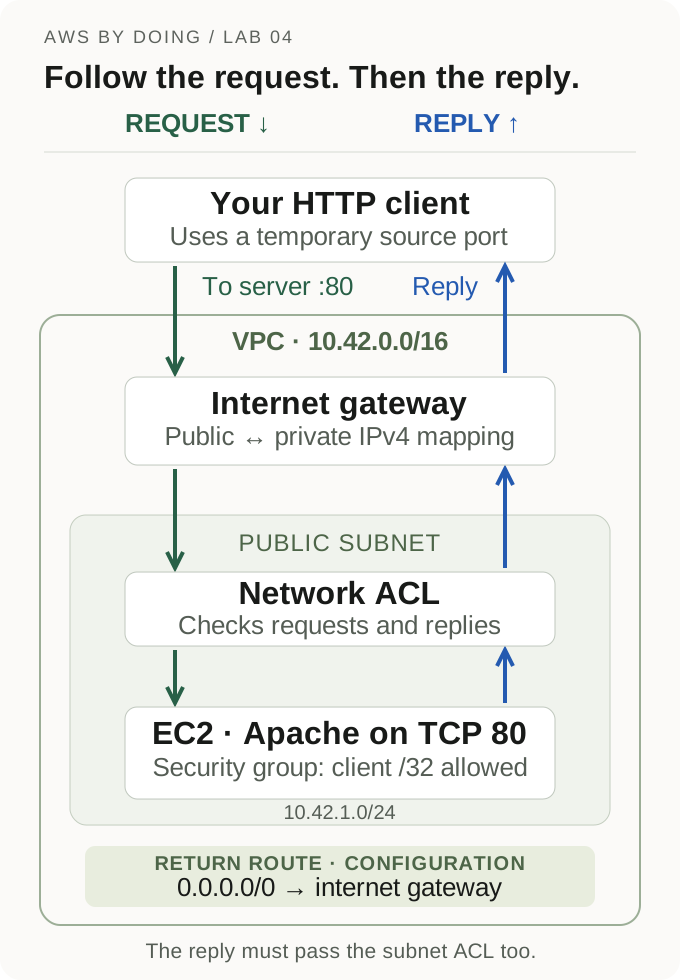
The diagram shows the components and checks we'll inspect. The route table supplies forwarding rules: AWS uses the destination address to choose where traffic goes next.
| Component | What it decides here |
|---|---|
| VPC | The private IPv4 address space for this network |
| Subnet | A smaller address range in one Availability Zone |
| Route table | Where traffic goes for a destination IP range |
| Internet gateway | The VPC's connection to the internet and public/private IPv4 mapping |
| Network ACL | Which traffic can enter or leave the subnet |
| Security group | Which traffic is allowed at the instance's network interface |
What makes an AWS subnet public?
A subnet is called public when its associated route table has a route to an internet gateway. That doesn't assign every instance a public IP or allow every incoming request. In this lab, we'll configure those pieces separately. Public subnet routing
Why does a network ACL need return-traffic rules?
Your HTTP client connects to the server's port 80 using a temporary source port. The response reverses those endpoints.
For illustration, suppose the client uses port 55000:
Request: client:55000 -> server:80
Reply: server:80 -> client:55000The real port depends on the client and can be translated by a router or VPN. That's why an outbound rule allowing only destination port 80 wouldn't cover this reply. AWS documents different ephemeral port ranges for different clients. Ephemeral ports
This matters because security groups are stateful, while network ACLs are stateless. A security group allows response traffic for an allowed connection. A network ACL evaluates the return traffic against its outbound rules, even when its inbound rule allowed the original request. Comparing the two controls
| Check | Security group | Network ACL |
|---|---|---|
| Boundary | Instance's network interface | Subnet |
| Rule actions | Allow | Allow or deny |
| Replies | Automatically allowed for a permitted connection | Evaluated against rules in the return direction |
| Evaluation | Matching allows from attached groups combine | First match, lowest rule number first |
We'll use that difference to break a working connection without touching the HTTP ingress rule.
Before creating resources
You'll need AWS CLI v2, Python 3, curl, uuidgen, grep, and diff, with an authenticated development identity. That identity needs permission to create, inspect, tag, and delete this lab's VPC resources, launch and terminate EC2, read the public Amazon Linux AMI parameter, and retrieve instance console output. It also needs permission to use the account's EBS encryption key.
Use a development account where you can create a separate network. We'll change only the resources created below. Don't substitute an existing application's subnet, route table, or ACL.
EC2, EBS, public IPv4 usage, and data transfer can incur charges. Check your account's billing plan and clean up in the same session. This small lab doesn't need a NAT gateway, load balancer, Elastic IP, or SSH access. EC2 pricing, VPC pricing
Run each block in the same interactive Bash or Zsh terminal. Stop on an unexpected setup error. The HTTP failure tests deliberately return errors, so don't run the entire article as a script that exits on every nonzero result. Read the cleanup section first.
Step 1: Give the experiment its own network
set +x
export AWS_PAGER=""
LAB_REGION=us-east-2
LAB_NAME="aws-by-doing-04-$(uuidgen | tr '[:upper:]' '[:lower:]')"
LAB_DIR=$(mktemp -d)

lab_aws() {
  aws --region "$LAB_REGION" --no-cli-pager "$@"
}

remember() {
  printf '%s\n' "$2" > "$LAB_DIR/$1"
}

remember region "$LAB_REGION"
remember name "$LAB_NAME"
printf 'Keep this directory for cleanup: %s\n' "$LAB_DIR"
lab_aws sts get-caller-identity --query Arn --output text

LAB_AZ=$(lab_aws ec2 describe-availability-zones \
  --filters Name=state,Values=available Name=zone-type,Values=availability-zone \
  --query 'AvailabilityZones[0].ZoneName' --output text)

LAB_VPC=$(lab_aws ec2 create-vpc --cidr-block 10.42.0.0/16 \
  --tag-specifications "ResourceType=vpc,Tags=[{Key=Name,Value=$LAB_NAME}]" \
  --query Vpc.VpcId --output text)
remember vpc "$LAB_VPC"
lab_aws ec2 wait vpc-available --vpc-ids "$LAB_VPC"

LAB_SUBNET=$(lab_aws ec2 create-subnet --vpc-id "$LAB_VPC" \
  --cidr-block 10.42.1.0/24 --availability-zone "$LAB_AZ" \
  --tag-specifications "ResourceType=subnet,Tags=[{Key=Name,Value=$LAB_NAME}]" \
  --query Subnet.SubnetId --output text)
remember subnet "$LAB_SUBNET"

LAB_IGW=$(lab_aws ec2 create-internet-gateway \
  --tag-specifications "ResourceType=internet-gateway,Tags=[{Key=Name,Value=$LAB_NAME}]" \
  --query InternetGateway.InternetGatewayId --output text)
remember igw "$LAB_IGW"
lab_aws ec2 attach-internet-gateway --internet-gateway-id "$LAB_IGW" \
  --vpc-id "$LAB_VPC"

LAB_RT=$(lab_aws ec2 create-route-table --vpc-id "$LAB_VPC" \
  --tag-specifications "ResourceType=route-table,Tags=[{Key=Name,Value=$LAB_NAME}]" \
  --query RouteTable.RouteTableId --output text)
remember route-table "$LAB_RT"

LAB_RT_ASSOC=$(lab_aws ec2 associate-route-table --route-table-id "$LAB_RT" \
  --subnet-id "$LAB_SUBNET" --query AssociationId --output text)
remember route-association "$LAB_RT_ASSOC"

lab_aws ec2 create-route --route-table-id "$LAB_RT" \
--destination-cidr-block 0.0.0.0/0 --gateway-id "$LAB_IGW"Check that the Availability Zone and each resource ID have a value. Stop if any is empty or None. The ARN identifies your caller; redact account identifiers before sharing output. Keep debug logging and shell tracing disabled throughout.
The 10.42.0.0/16 and 10.42.1.0/24 ranges are this isolated network's private addresses. This notation is called CIDR: the suffix gives the number of fixed prefix bits, so the /24 subnet is a smaller address block inside our /16 VPC. We're not peering it with another VPC or connecting it to a corporate network.
The custom route table contains the VPC's local route. We add 0.0.0.0/0, meaning other IPv4 destinations use the internet gateway. This is a route, not an inbound allow rule. Route tables
Step 2: Make the subnet's ACL explicit
A new custom ACL starts with deny rules. We'll add IPv4 allow rules in both directions before associating it with our subnet. This makes a simple baseline for the later deny experiment; the security group will limit HTTP ingress to our client. Check that LAB_OLD_ACL_ASSOC contains an association ID before running the replacement command.
LAB_ACL=$(lab_aws ec2 create-network-acl --vpc-id "$LAB_VPC" \
  --tag-specifications "ResourceType=network-acl,Tags=[{Key=Name,Value=$LAB_NAME}]" \
  --query NetworkAcl.NetworkAclId --output text)
remember acl "$LAB_ACL"

lab_aws ec2 create-network-acl-entry --network-acl-id "$LAB_ACL" \
  --ingress --rule-number 100 --protocol -1 \
  --cidr-block 0.0.0.0/0 --rule-action allow

lab_aws ec2 create-network-acl-entry --network-acl-id "$LAB_ACL" \
  --egress --rule-number 100 --protocol -1 \
  --cidr-block 0.0.0.0/0 --rule-action allow

LAB_OLD_ACL_ASSOC=$(lab_aws ec2 describe-network-acls \
  --filters "Name=association.subnet-id,Values=$LAB_SUBNET" \
  --query "NetworkAcls[0].Associations[?SubnetId=='$LAB_SUBNET'].NetworkAclAssociationId | [0]" \
  --output text)

LAB_ACL_ASSOC=$(lab_aws ec2 replace-network-acl-association \
  --association-id "$LAB_OLD_ACL_ASSOC" --network-acl-id "$LAB_ACL" \
  --query NewAssociationId --output text)
remember acl-association "$LAB_ACL_ASSOC"Each subnet has one associated ACL. Replacing the association returns a new association ID; it doesn't add a second ACL to the subnet. ACL associations
The broad ACL allows give us a simple starting point for this experiment. A production ACL needs rules chosen for its actual traffic. Rules are evaluated in number order, and the first match wins. Our later deny at 50 will take precedence over the allow at 100. ACL rule evaluation
Step 3: Launch the same small web server
First resolve the current Amazon Linux 2023 image and prepare its encrypted root volume. This is the same approach as lab 3.
LAB_AMI=$(lab_aws ssm get-parameter \
  --name /aws/service/ami-amazon-linux-latest/al2023-ami-kernel-default-x86_64 \
  --query Parameter.Value --output text)

lab_aws ec2 describe-images --owners amazon --image-ids "$LAB_AMI" \
  --output json > "$LAB_DIR/image.json"

python3 - "$LAB_DIR" <<'PY'
import json
import sys
from pathlib import Path

directory = Path(sys.argv[1])
images = json.loads((directory / "image.json").read_text())["Images"]
assert len(images) == 1, "Expected one Amazon-owned image"
image = images[0]
assert image["State"] == "available"
assert image["Architecture"] == "x86_64"
assert image["RootDeviceType"] == "ebs"
assert len(image["BlockDeviceMappings"]) == 1, "Review additional image devices"
device = image["BlockDeviceMappings"][0]
assert device["DeviceName"] == image["RootDeviceName"]
mapping = [{"DeviceName": image["RootDeviceName"], "Ebs": {
    "VolumeSize": device["Ebs"]["VolumeSize"], "VolumeType": "gp3",
    "Encrypted": True, "DeleteOnTermination": True
}}]
(directory / "storage.json").write_text(json.dumps(mapping, indent=2))
print(f'Image: {image["Name"]}')
PY

cat > "$LAB_DIR/user-data.sh" <<'BOOT'
#!/bin/bash
set -euo pipefail
dnf install -y httpd
printf 'Hello from AWS by Doing, lab 4.\n' > /var/www/html/index.html
systemctl enable --now httpd
curl --fail --silent --show-error http://127.0.0.1/ > /tmp/lab-response.txt
printf 'Hello from AWS by Doing, lab 4.\n' | cmp - /tmp/lab-response.txt
printf 'AWS_BY_DOING_04_HTTP_READY\n' > /dev/console
BOOT

printf 'Hello from AWS by Doing, lab 4.\n' > "$LAB_DIR/expected.txt"

LAB_CLIENT_IP=$(curl --noproxy '*' -4 --fail --silent --show-error \
  https://checkip.amazonaws.com)
LAB_CLIENT_CIDR=$(python3 - "$LAB_CLIENT_IP" <<'PY'
import ipaddress
import sys
address = ipaddress.IPv4Address(sys.argv[1].strip())
assert address.is_global, "Expected the client's public IPv4 address"
print(f"{address}/32")
PY
)
remember client-cidr "$LAB_CLIENT_CIDR"

LAB_SG=$(lab_aws ec2 create-security-group --vpc-id "$LAB_VPC" \
  --group-name "$LAB_NAME" --description 'Disposable AWS by Doing VPC lab' \
  --tag-specifications "ResourceType=security-group,Tags=[{Key=Name,Value=$LAB_NAME}]" \
  --query GroupId --output text)
remember security-group "$LAB_SG"

lab_aws ec2 authorize-security-group-ingress --group-id "$LAB_SG" \
  --protocol tcp --port 80 --cidr "$LAB_CLIENT_CIDR"

LAB_INSTANCE=$(lab_aws ec2 run-instances \
  --image-id "$LAB_AMI" --instance-type t3.micro --count 1 \
  --client-token "$LAB_NAME" \
  --network-interfaces \
    "DeviceIndex=0,SubnetId=$LAB_SUBNET,Groups=$LAB_SG,AssociatePublicIpAddress=true,DeleteOnTermination=true" \
  --block-device-mappings "file://$LAB_DIR/storage.json" \
  --metadata-options HttpEndpoint=enabled,HttpTokens=required \
  --credit-specification CpuCredits=standard \
  --user-data "file://$LAB_DIR/user-data.sh" \
  --tag-specifications \
    "ResourceType=instance,Tags=[{Key=Name,Value=$LAB_NAME}]" \
    "ResourceType=volume,Tags=[{Key=Name,Value=$LAB_NAME}]" \
  --query 'Instances[0].InstanceId' --output text)
remember instance "$LAB_INSTANCE"

lab_aws ec2 wait instance-running --instance-ids "$LAB_INSTANCE"

LAB_IP=$(lab_aws ec2 describe-instances --instance-ids "$LAB_INSTANCE" \
  --query 'Reservations[0].Instances[0].PublicIpAddress' --output text)
LAB_VOLUME=$(lab_aws ec2 describe-instances --instance-ids "$LAB_INSTANCE" \
  --query 'Reservations[0].Instances[0].BlockDeviceMappings[0].Ebs.VolumeId' --output text)
LAB_ENI=$(lab_aws ec2 describe-instances --instance-ids "$LAB_INSTANCE" \
  --query 'Reservations[0].Instances[0].NetworkInterfaces[0].NetworkInterfaceId' --output text)
remember public-ip "$LAB_IP"
remember volume "$LAB_VOLUME"
remember eni "$LAB_ENI"Confirm the client address check succeeded before adding the rule. Use the same network connection for every HTTP test. A VPN change or split routing can change the public source address, invalidating the /32 comparison. The curl commands bypass configured HTTP proxies so we're testing a direct connection.
Our security group allows inbound TCP 80 only from that address. Its initial outbound allow lets the instance download Apache. The custom ACL currently permits both directions. Inspect those rules before moving on. Check that LAB_IP is a public IPv4 address and keep the disk and interface IDs for cleanup.
The instance has one automatically assigned public IPv4 address, one encrypted gp3 root volume, and IMDSv2 required. It has no instance profile or EC2 key pair. standard CPU credit mode avoids Unlimited surplus-credit charges; it doesn't make compute usage free. Launch settings
Our run used al2023-ami-2023.12.20261016.0-kernel-6.18-x86_64 in us-east-2a, with an encrypted 8 GiB gp3 root volume. The public AMI parameter can resolve to a newer image when you repeat the lab.
Step 4: Establish a working baseline
Retrieve the boot output and check for the readiness marker:
lab_aws ec2 get-console-output --instance-id "$LAB_INSTANCE" \
  --latest --query Output --output text > "$LAB_DIR/console.txt"
grep -F 'AWS_BY_DOING_04_HTTP_READY' "$LAB_DIR/console.txt"If the marker isn't there, allow time for installation and retrieve the output again. Console output can lag behind the guest. Don't interpret its first appearance as exact application startup time. If boot fails, inspect the error and clean up; don't start the network experiments with an unverified application. Console output
We confirmed the marker before the two network tests. The guest log reported cloud-init completion at 16:57:29 UTC; we retrieved the marker at 16:58:26 UTC. The console showed us what had happened earlier. A direct HTTP check also returned the exact expected page before we began the comparisons.
Now inspect the path we created:
lab_aws ec2 describe-route-tables --route-table-ids "$LAB_RT" \
  --query 'RouteTables[0].{Routes:Routes,Associations:Associations}' --output json
lab_aws ec2 describe-internet-gateways --internet-gateway-ids "$LAB_IGW" \
  --query 'InternetGateways[0].Attachments' --output json
lab_aws ec2 describe-network-acls --network-acl-ids "$LAB_ACL" \
  --query 'NetworkAcls[0].{Rules:Entries,Associations:Associations}' --output json
lab_aws ec2 describe-security-groups --group-ids "$LAB_SG" \
  --query 'SecurityGroups[0].{Inbound:IpPermissions,Outbound:IpPermissionsEgress}' \
  --output json

probe() {
  local probe_status
  curl --noproxy '*' -4 --connect-timeout 5 --max-time 8 \
    --silent --show-error --output "$LAB_DIR/$1.txt" \
    --write-out 'HTTP %{http_code}\n' "http://$LAB_IP/"
  probe_status=$?
  printf 'curl exit: %s\n' "$probe_status"
  return "$probe_status"
}

probe baseline
diff "$LAB_DIR/expected.txt" "$LAB_DIR/baseline.txt"Verify the subnet's explicit route-table association, an active default route to the attached gateway, the custom ACL's association and two allow rules, and the single client-scoped HTTP ingress rule.
Our baseline returned:
HTTP 200
curl exit: 0The body was Hello from AWS by Doing, lab 4. followed by a newline: 32 bytes. The byte comparison passed. With diff, no output means the files match.
The helper prints curl's exit status and its HTTP status output. Check both, then compare the body: exit 0 alone doesn't establish HTTP 200 or matching content. HTTP 000 means curl didn't receive an HTTP status. Stop if the baseline doesn't work. You need a working request before you can use the next change to explain a failure.
Step 5: Keep the public IP, remove the internet route
Delete only the default route in the custom table we just created:
lab_aws ec2 delete-route --route-table-id "$LAB_RT" \
  --destination-cidr-block 0.0.0.0/0

lab_aws ec2 describe-route-tables --route-table-ids "$LAB_RT" \
  --query 'RouteTables[0].Routes' --output json

probe missing-routeOur request timed out after about five seconds:
HTTP 000
curl exit: 28We inspected the table and confirmed that the default route was absent while the local VPC route remained. The instance still had its public IPv4 address and the same HTTP security-group rule. Curl received no HTTP response body.
This is why a public IP alone doesn't establish reachability. The external connection needs the network path too. In this direct setup, the subnet's route table supplies the path back to the internet. Routing to an internet gateway
Restore the route and confirm the response comes back before testing anything else:
lab_aws ec2 create-route --route-table-id "$LAB_RT" \
  --destination-cidr-block 0.0.0.0/0 --gateway-id "$LAB_IGW"

probe restored-route
diff "$LAB_DIR/expected.txt" "$LAB_DIR/restored-route.txt"The first request after restoring the route returned HTTP 200, curl exit 0, and the exact same 32 bytes. We confirmed the route was active and targeted our attached internet gateway. If your response doesn't return, inspect the route and its association, and stop before the next experiment.
Step 6: Allow the request, block traffic back to the client
Leave the route and security group alone. Add one outbound ACL deny for TCP traffic destined for our client's address:
lab_aws ec2 create-network-acl-entry --network-acl-id "$LAB_ACL" \
  --egress --rule-number 50 --protocol 6 \
  --port-range From=0,To=65535 --cidr-block "$LAB_CLIENT_CIDR" \
  --rule-action deny

lab_aws ec2 describe-network-acls --network-acl-ids "$LAB_ACL" \
  --query 'NetworkAcls[0].Entries' --output json

probe blocked-replyThe request timed out again after about five seconds: curl exit 28, HTTP status output 000, and no response body. We verified that rule 50 was outbound only, targeted our client's /32, and denied TCP ports 0–65535. The internet route and HTTP security-group rule were unchanged.
Rule 50 matches outbound TCP to our client before rule 100 can allow it. Inbound HTTP remains permitted, but the TCP reply is blocked at the subnet boundary. That can prevent the TCP handshake from completing, before Apache ever receives an HTTP request.
The deny covers all TCP destination ports to this one address, so the test doesn't depend on the client's ephemeral port range or a router's port translation. Other IPv4 destinations still match the existing allow. In a more selective ACL, the allowed return ports must match the clients you support. Custom ACL examples
The security group's stateful behavior doesn't override an ACL deny. Each control still has to permit the traffic it evaluates. Security groups and ACLs
Remove only our temporary rule and repeat the request:
lab_aws ec2 delete-network-acl-entry --network-acl-id "$LAB_ACL" \
  --egress --rule-number 50

probe restored-acl
diff "$LAB_DIR/expected.txt" "$LAB_DIR/restored-acl.txt"The first request after deleting rule 50 returned HTTP 200 with curl exit 0 and matching bytes. We confirmed the deny was gone. We didn't restart Apache, change the page, or expand the security group's inbound access between these tests.
What the experiment can tell us
These are the results from our run. Each successful response contained the same 32-byte body:
| Stage | Internet route | ACL outbound TCP to client | Observed external result |
|---|---|---|---|
| Baseline | Present | Allowed | HTTP 200, exit 0, matching bytes |
| Route removed | Absent | Allowed | Timeout, exit 28, HTTP output 000 |
| Route restored | Present | Allowed | HTTP 200, exit 0, matching bytes |
| ACL deny added | Present | Denied at rule 50 | Timeout, exit 28, HTTP output 000 |
| ACL deny removed | Present | Allowed | HTTP 200, exit 0, matching bytes |
A timeout alone doesn't tell you which component is wrong. Here, we started with a working response, inspected the configuration, changed one thing, and got the response back when we reversed that change.
We didn't capture packets or collect Apache's access logs for the failed connections. These results establish the effect of each configuration change. They don't establish that a failed HTTP request reached Apache; the TCP handshake could have failed first.
Clean up the server, then the network
Use only the IDs saved for this run. Confirm the instance's name, client token, and VPC before terminating it:
lab_aws ec2 describe-instances --instance-ids "$LAB_INSTANCE" \
  --query 'Reservations[0].Instances[0].{Name:Tags,Token:ClientToken,VPC:VpcId,State:State.Name}' \
  --output json

lab_aws ec2 terminate-instances --instance-ids "$LAB_INSTANCE" \
  --query 'TerminatingInstances[].CurrentState.Name' --output text
lab_aws ec2 wait instance-terminated --instance-ids "$LAB_INSTANCE"
lab_aws ec2 wait volume-deleted --volume-ids "$LAB_VOLUME"
lab_aws ec2 describe-network-interfaces --network-interface-ids "$LAB_ENI"Wait for the network interface check to return InvalidNetworkInterfaceID.NotFound. The automatically assigned public IPv4 is released on termination; we didn't allocate an Elastic IP. If the disk or interface remains, inspect the specific dependency before deleting the network.
Then remove the dedicated resources in dependency order:
lab_aws ec2 delete-security-group --group-id "$LAB_SG"
lab_aws ec2 disassociate-route-table --association-id "$LAB_RT_ASSOC"
lab_aws ec2 delete-subnet --subnet-id "$LAB_SUBNET"
lab_aws ec2 delete-network-acl --network-acl-id "$LAB_ACL"
lab_aws ec2 delete-route-table --route-table-id "$LAB_RT"

lab_aws ec2 detach-internet-gateway --internet-gateway-id "$LAB_IGW" \
  --vpc-id "$LAB_VPC"
lab_aws ec2 delete-internet-gateway --internet-gateway-id "$LAB_IGW"
lab_aws ec2 delete-vpc --vpc-id "$LAB_VPC"

lab_aws ec2 describe-vpcs --vpc-ids "$LAB_VPC"Expect the final check to return InvalidVpcID.NotFound. A permission error isn't evidence of deletion. The VPC's automatically created default security group, default ACL, and main route table are removed with the VPC. We explicitly remove the custom resources first. VPC deletion dependencies
Our cleanup checks confirmed that the instance was terminated, its disk and interface were gone, and each dedicated network resource returned its specific NotFound error. Cleanup was verified at 10:00 PDT on October 18. No resource created for this lab remains active. Actual billed cost wasn't measured.
If cleanup is partially complete, a repeated deletion can return a resource-specific NotFound error. Verify the exact recorded resource is absent before continuing. For a dependency or permission error, inspect it rather than broadly deleting resources in the account.
If your terminal closes, the small files in LAB_DIR retain the returned IDs, region, and run name. Restore those values before cleanup. If a creation response was interrupted before its ID was saved, inspect resources tagged with this run's exact name. For a launch retry, find the instance by its client token before attempting another launch. Keep those local records until all deletions are verified.
Follow the connection in both directions
“The security group allows it” is a useful observation. It doesn't tell you whether a route exists, whether the subnet's ACL permits the reply, or whether the application is serving anything.
For your next EC2 timeout, follow that connection: instance address and subnet, effective route table and gateway, ACL in both directions, attached security groups, then application readiness. Establish a working response where you can and change one thing at a time.
The return path deserves the same attention as the incoming request.
Frequently asked questions
Why can EC2 have a public IP and still be unreachable?
A public IP supplies an address. You still need the subnet's route to an attached internet gateway, traffic rules that permit the connection in both directions, and an application listening on the requested port. In Step 5, the address and HTTP security-group rule stayed in place, but removing the route caused a timeout. Restoring it brought the response back.
Can a network ACL block traffic that a security group allows?
Yes. A security-group allow doesn't override a network ACL deny. In Step 6, inbound HTTP remained allowed while an outbound ACL rule blocked TCP to our client. The connection timed out. Deleting that deny restored HTTP 200 without changing the security group.
Does this public EC2 lab need a NAT gateway?
No. Our instance has a public IPv4 address and uses an internet gateway directly. A public NAT gateway is one way to give private instances outbound internet access while preventing unsolicited inbound connections. That's a different setup from the direct client-to-server connection we tested here. NAT gateway behavior
Related posts
- EC2: What Actually Happens When You Launch a Server? — separate instance state, application readiness, and external reachability.
- Understanding AWS IAM: Upload Allowed, Download Denied — identify which permission a specific request needs.
- Understanding Amazon S3 by Uploading One File — start the series with a stored object and a verified response.